




Introduction
Over the last decade, the way organizations build, deploy, and manage IT infrastructure has changed dramatically. Traditional on‑premises data centers—where companies purchase physical servers, networking devices, and storage—are slowly giving way to cloud-based platforms that offer flexibility, scalability, and cost efficiency. At the center of this transformation stands Microsoft Azure , one of the world’s leading cloud computing platforms.
This blog provides a complete, beginner‑to‑professional introduction to Azure Cloud Computing . Whether you are a student starting your cloud journey, an IT professional transitioning from on‑premises infrastructure, or an aspirant preparing for AZ‑104: Azure Administrator , this guide will help you build a strong conceptual foundation.
What Is Cloud Computing?
Cloud computing is the delivery of computing services—such as servers, storage, databases, networking, software, and analytics—over the internet (“the cloud”). Instead of owning and maintaining physical hardware, organizations rent resources from cloud providers and pay only for what they use.
Key Characteristics of Cloud Computing
- On‑demand self‑service – Resources can be provisioned instantly without human interaction.
- Broad network access – Services are accessible over the internet from anywhere.
- Resource pooling – Providers share infrastructure among multiple customers securely.
- Rapid elasticity – Resources can scale up or down automatically based on demand.
- Measured service – Usage is monitored, controlled, and billed on a pay‑as‑you‑go basis.
These characteristics eliminate many limitations of traditional IT infrastructure and allow businesses to focus on innovation instead of maintenance.
Traditional IT vs Cloud Computing
Before cloud adoption, organizations relied on on‑premises data centers . While this approach offered full control, it also introduced several challenges:
- High upfront capital expenditure (servers, racks, cooling, power)
- Long procurement cycles
- Limited scalability
- Dedicated maintenance teams
- Risk of hardware failures and downtime
Cloud computing solves these problems by shifting infrastructure management to the cloud provider. Companies can deploy applications in minutes, scale globally, and reduce operational overhead.
What Is Microsoft Azure?
Microsoft Azure is a cloud computing platform and service offered by Microsoft. It provides a wide range of cloud services including computing, storage, networking, databases, identity management, security, analytics, and AI.
Azure was launched in 2010 and has since grown into a global cloud ecosystem with data centers across multiple continents. It supports businesses of all sizes—from startups to Fortune 500 enterprises—and integrates seamlessly with Microsoft products like Windows Server, Active Directory, Office 365, and SQL Server.
Why Choose Microsoft Azure?
Azure stands out for several reasons:
- Global Presence:
Azure has data centers in multiple regions worldwide , allowing organizations to deploy applications close to their users for better performance and compliance.
- Hybrid Cloud Capabilities:
Azure is designed with hybrid cloud in mind, enabling seamless integration between on‑premises infrastructure and the cloud.
- Enterprise Security & Compliance:
Microsoft invests heavily in security, offering built‑in compliance for industry standards such as ISO, SOC, GDPR, and more.
- Integration with Microsoft Ecosystem:
Azure works naturally with Windows Server, Active Directory, PowerShell, and Microsoft 365, making it a preferred choice for existing Microsoft environments.
- Wide Service Portfolio:
From basic virtual machines to advanced AI and machine learning services, Azure offers solutions for almost every IT requirement.
Cloud Service Models in Azure
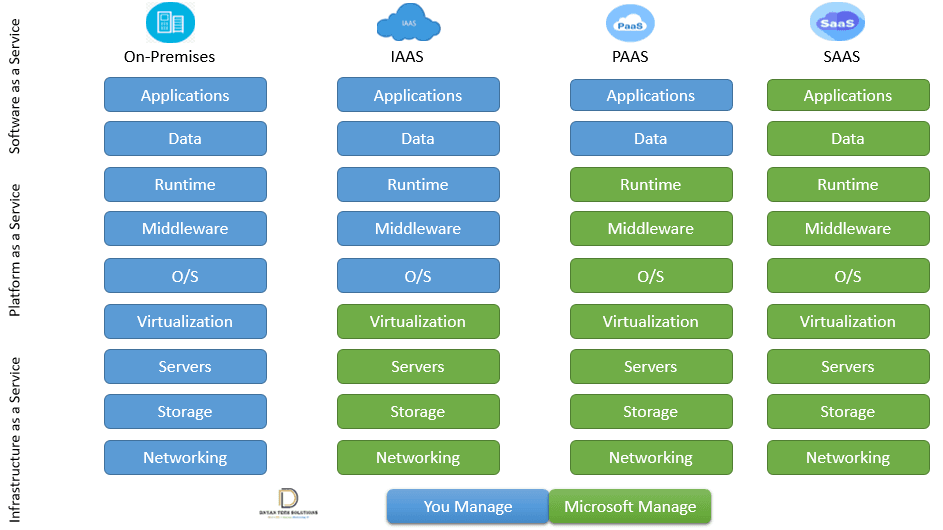
Azure delivers services using three primary cloud service models :
1. Infrastructure as a Service (IaaS)
In IaaS, Azure provides virtualized hardware resources such as:
- Virtualization
- Servers
- Storage
- Networking
The customer is responsible for managing:
- Applications
- Data
- Runtime
- Middleware
- Operating System (O/S)
Example: Hosting a Windows Server VM in Azure instead of buying physical hardware.
2. Platform as a Service (PaaS)
PaaS provides a managed platform where Azure handles infrastructure and runtime environments, while customers focus on application development.
Azure manages:
- Runtime
- Middleware
- Operating System (O/S)
- Virtualization
- Server
- Storage
- Networking
Customer manages:
- Applications
- Data
Example: Azure App Service for hosting web applications.
3. Software as a Service (SaaS)
SaaS delivers fully managed software applications over the internet.
Azure (Microsoft) manages everything:
- Applications
- Data
- Runtime
- Middleware
- Operating System (O/S)
- Virtualization
- Server
- Storage
- Networking
Example: Microsoft 365, Outlook, OneDrive.
Azure Deployment Models
Azure supports different deployment models based on business needs:
1. Public Cloud
Resources are shared among multiple customers but isolated securely.
2. Private Cloud
Dedicated infrastructure for a single organization, often hosted on‑premises.
3. Hybrid Cloud
Combination of on‑premises infrastructure and Azure cloud services.
Hybrid cloud is particularly popular among enterprises migrating gradually to the cloud.
Here is the Microsoft article for deep dive into the Azure service models and deployment model
Core Azure Components
To understand Azure effectively, it is important to know its core building blocks:
Azure Regions
A region is a geographical area containing one or more data centers. List of azure regions
Region Pairs
Each Azure region is paired with another region within the same geography for disaster recovery.
Availability Zones
Physically separate data centers within a region designed for high availability.
Azure Resource Groups
Logical containers that hold related Azure resources.
Azure Subscriptions
Used for billing, access control, and resource organization.
Azure Resource Management
Azure uses Azure Resource Manager (ARM) to manage and deploy resources. ARM enables:
- Consistent resource deployment
- Role‑based access control (RBAC)
- Tagging for cost management
- Infrastructure as Code (IaC)
ARM templates allow administrators to automate infrastructure deployment efficiently.
Security in Azure
Security is a shared responsibility between Microsoft and the customer.
Microsoft Responsibilities
- Physical data center security
- Network infrastructure protection
- Host OS security
Customer Responsibilities
- OS hardening
- Application security
- Identity and access management
Key Azure security services include:
- Azure Active Directory
- Azure RBAC
- Network Security Groups
- Azure Defender
Pricing and Cost Management
Azure follows a pay‑as‑you‑go pricing model. Customers are charged based on actual usage.
Cost optimization tools include:
- Azure Pricing Calculator
- Azure Cost Management
- Reserved Instances
Here is the link for azure pricing calculator where you can explore azure resources pricing Azure Pricing Calculator
Proper planning helps organizations control cloud expenses effectively.
Real‑World Use Cases of Azure
1 Hosting enterprise applications
2 Disaster recovery and backup
3 DevOps and CI/CD pipelines
4 Data analytics and big data processing
5 Hybrid infrastructure modernization
Azure is widely used in industries such as finance, healthcare, education, and government.
Azure from an AZ‑104 Exam Perspective
For AZ‑104 Azure Administrator , candidates should understand:
- Cloud concepts and service models
- Core Azure components
- Resource management basics
- Security responsibility model
A strong understanding of cloud fundamentals is essential before moving to advanced Azure services.
Common Beginner Questions
Q1: Is Azure suitable for beginners?
Yes. Azure provides free tiers, documentation, and learning paths.
Q2: Do I need coding knowledge to learn Azure?
Basic scripting helps, but many Azure tasks are GUI‑based.
Q3: Can Azure replace on‑premises servers completely?
Yes, but many organizations choose a hybrid approach.
Summary
Azure Cloud Computing enables organizations to build scalable, secure, and cost‑effective IT solutions without managing physical infrastructure. By understanding cloud concepts, service models, and Azure fundamentals, learners can confidently move toward advanced topics such as virtual machines, networking, storage, and security.
This blog serves as the foundation for the AZ‑104 Azure Administrator journey. In the next topic, we will explore Azure Global Infrastructure, Regions, and Availability Zones in detail.
Author: Dnyan Tech Solutions (DTS) Training institute.
Course: AZ‑104 Azure Administrator Training.
Leave a Reply