




Introduction
When organizations move their workloads to the cloud, one of the most critical questions they ask is: Where will my data and applications actually run? The answer to this question lies in understanding Azure Global Infrastructure.
Microsoft Azure is not a single data center or a single location—it is a globally distributed cloud platform with data centers spread across the world. Azure’s global infrastructure is designed to provide high availability, low latency, scalability, compliance, and disaster recovery for businesses of all sizes.
In this blog, we will explore Azure Global Infrastructure in depth, starting from basic concepts and moving toward an enterprise-level understanding. This topic is extremely important for AZ-104 Azure Administrator certification and real-world Azure design decisions.
What Is Azure Global Infrastructure?
Azure Global Infrastructure refers to the worldwide network of Microsoft-managed data centers, regions, availability zones, and networking components that deliver Azure cloud services.
It enables organizations to: – Deploy applications close to end users – Achieve high availability and fault tolerance – Meet data residency and compliance requirements – Build disaster recovery and business continuity solutions
Azure currently operates in multiple geographic regions, making it one of the largest cloud infrastructures in the world.
Azure Geography
An Azure Geography is a discrete market or region that preserves data residency and compliance boundaries. Each geography contains one or more Azure regions.
Examples of Azure Geographies
- India
- United States
- Europe
- Asia Pacific
- Middle East
Geographies are designed to ensure that customer data remains within specific legal and compliance boundaries.
Azure Regions
Please refer this Microsoft article to learn more about regions Azure Regions
An Azure Region is a set of data centers deployed within a specific geographic area and connected through a low-latency network.
Key Characteristics of Azure Regions
- Each region contains one or more data centers
- Regions are isolated from each other
- Resources deployed in a region stay within that region unless configured otherwise
Examples of Azure Regions
- Central India
- South India
- West US
- East US
- North Europe
- Southeast Asia
Azure allows customers to choose regions based on performance, compliance, cost, and availability requirements.
Azure Region Pairs
To support disaster recovery and business continuity, Microsoft pairs each Azure region with another region within the same geography. This is known as a Region Pair.
Key Features of Region Pairs
- Regions are separated by at least 300 miles (where possible)
- Updates are rolled out sequentially to minimize downtime
- One region is prioritized for recovery during outages
Example Region Pairs
- Central India ↔ South India
- East US ↔ West US
- North Europe ↔ West Europe
Region pairs play a crucial role in designing resilient Azure architectures.
Availability Zones
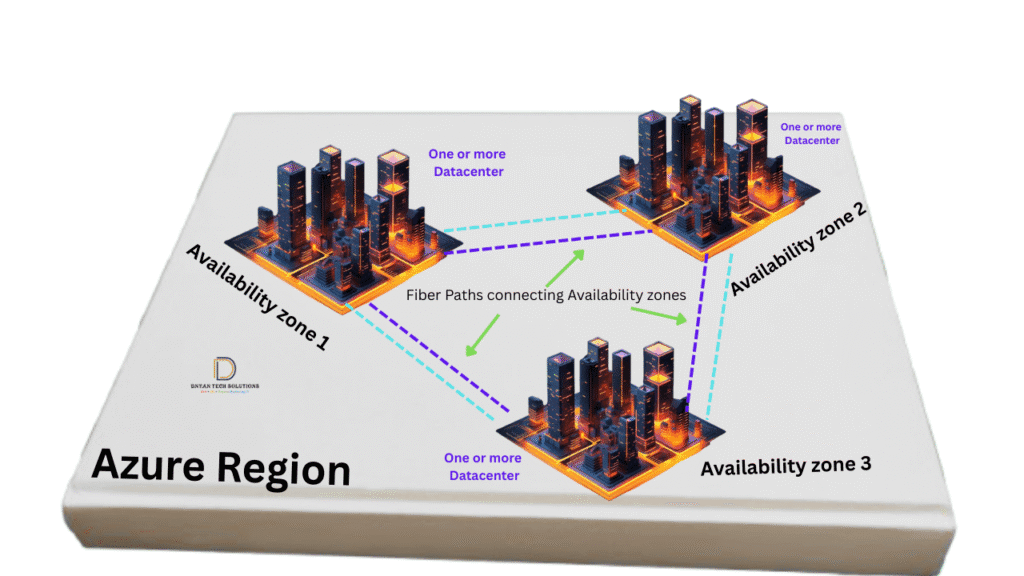
Availability Zones (AZs) are physically separate data centers within an Azure region. Each zone has independent power, cooling, and networking.
Benefits of Availability Zones
- Protection against data center failures
- High availability for mission-critical workloads
- Improved fault tolerance
Availability Zones Use Cases
- Running multiple VM instances across zones
- Zone-redundant storage
- Load-balanced applications
Not all regions support Availability Zones, so region selection is an important design decision.
Azure Data Centers

Azure data centers are designed with enterprise-grade security and reliability.
Data Center Features
- Physical security (biometric access, surveillance)
- Redundant power and cooling systems
- High-speed networking
- Continuous monitoring and maintenance
Microsoft manages all physical infrastructure, allowing customers to focus on applications and services.
Azure Global Network
Azure operates one of the largest global networks in the world. This network connects Azure data centers, regions, and edge locations.
Key Components of Azure Global Network
- High-capacity fiber backbone
- Software-defined networking (SDN)
- Global load balancing
This network ensures low latency, high throughput, and secure data transmission between regions.
Azure Edge Locations
Azure edge locations bring services closer to end users using technologies like Azure CDN and Azure Front Door.
Benefits of Edge Locations
- Faster content delivery
- Reduced latency
- Improved user experience
Edge locations are especially useful for global web applications and content-heavy platforms.
Compliance and Data Residency
Azure Global Infrastructure is designed to meet global compliance standards.
Compliance Features
- Data residency control
- Industry certifications (ISO, SOC, GDPR)
- Government cloud offerings
This makes Azure suitable for regulated industries such as healthcare, finance, and government.
High Availability and Disaster Recovery in Azure
Azure global infrastructure supports multiple high availability (HA) and disaster recovery (DR) strategies.
High Availability Options
- Availability Zones
- Load Balancers
- Zone-redundant services
Disaster Recovery Options
- Region pairs
- Azure Site Recovery
- Geo-redundant storage
A well-designed Azure architecture often combines both HA and DR strategies.
Azure Global Infrastructure from an AZ-104 Perspective
For the AZ-104 Azure Administrator exam, you must clearly understand:
- Difference between geography, region, and availability zone
- Region pairs and their purpose
- Availability Zones use cases
- How global infrastructure impacts availability and disaster recovery
These concepts are frequently tested in scenario-based questions.
Common Interview Questions
Q1: What is the difference between a region and an availability zone?
A region is a geographic area, while availability zones are physically separate data centers within a region.
Q2: Why are region pairs important?
They help ensure disaster recovery and controlled updates.
Q3: Does every Azure region support availability zones?
No, availability zone support varies by region.
Best Practices for Using Azure Global Infrastructure
- Choose regions closest to users
- Use availability zones for critical workloads
- Plan disaster recovery using region pairs
- Understand compliance requirements before selecting regions
To understand Azure Global Infrastructure better, we strongly recommend reading:
- Azure Cloud Computing: simplified – Learn the fundamentals of cloud computing and Microsoft Azure before diving into global infrastructure concepts.
Summary
Azure Global Infrastructure is the backbone of Microsoft Azure, enabling organizations to build highly available, resilient, and globally scalable cloud solutions. By understanding geographies, regions, region pairs, availability zones, and global networking, Azure administrators can design architectures that meet both technical and business requirements.
In the next blog, we will deep dive into Azure Regions, Region Pairs, and Availability Zones with real-world architecture examples.
Author: Dnyan Tech Solutions (DTS) Training institute
Course: AZ-104 Azure Administrator Training
Leave a Reply